Home Assistant integration for the B-Logicx bus gateway (NWM / NWX)
View the Project on GitHub rafverbiest/homeassistant_b-logicx
← Home · Nederlands · English
Installation
Via HACS (recommended)
- Install HACS if you do not already have it (no longer needed from Home Assistant 2026.11 on).
- In Home Assistant: HACS (marketplace in >2026.11) → top-right ⋮ → Custom repositories.
-
Repository URL:
https://github.com/rafverbiest/homeassistant_b-logicxCategory: Integration
- Add → find B-Logicx → Download.
- Restart Home Assistant.
- Settings → Devices & services → Add integration → B-Logicx.
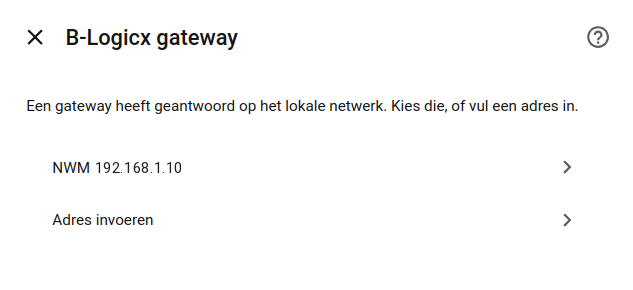
- Enter the IP address of the NWM / NWX (default port
10001).
When a gateway answers, pick it. Otherwise type the address.
Also see the README.
Manual (without HACS)
- Copy the
custom_components/b_logicxfolder into your HAconfig/custom_components/directory. - Restart Home Assistant.
- Add the integration as above (steps 6–7).
First configuration
After adding the integration:
- Configure addresses in the options UI (add / edit / remove), or
- Import a YAML file (YAML, template:
custom_components/b_logicx/flow/template.yaml). - New feature: automatic detection of the bus gateway and the bus addresses.
Optional later: turn on the Virtual Status Module and the TCP bus repeater in integration settings — see SoftM and Bus repeater.